Context Engineering with SQL
Using a filesystem as the interface for your agent's context is having a moment. Claude Code made it look like the obvious answer and a wave of agent startups are building around it. It's the right choice for code, because code lives in a filesystem and the map is the territory. It's the wrong context interface for most business data, though, where the corpus is a web of documents with rich metadata that filesystems can't easily express. SQL is a more natural — and, we believe, underrated — context interface for that shape of data.
| Filesystem (bash + grep) | SQL | Semantic Search | |
|---|---|---|---|
| Use when | Dependencies are encoded in file contents and directory structure | Complex relationships between documents | Need to search by "concept" rather than keywords |
| Avoid when | Forcing your data into a tree loses or duplicates the metadata or relationships the agent needs | Your corpus has large binary blobs or multi-TB scale (use object storage alongside) | Keyword precision matters more than semantic similarity — vector search adds noise when you need exact matches |
- Use when
- Dependencies are encoded in file contents and directory structure
- Avoid when
- Forcing your data into a tree loses or duplicates the metadata or relationships the agent needs
- Use when
- Complex relationships between documents
- Avoid when
- Your corpus has large binary blobs or multi-TB scale (use object storage alongside)
- Use when
- Need to search by "concept" rather than keywords
- Avoid when
- Keyword precision matters more than semantic similarity — vector search adds noise when you need exact matches
Where the filesystem context interface broke down
At Comulate we're building AI agents for insurance. Our agents have to search and reason over hundreds of thousands of emails, PDFs, spreadsheets, etc. to solve domain-specific tasks.
When we started, Claude Code was the obvious reference point and the agent we had the most personal experience using. After seeing how well it could navigate our codebase and solve engineering problems, we thought a file-system approach with bash tools would be the silver bullet for us.
Unfortunately, the filesystem context performed worse than we expected. Our data wasn't shaped like a filesystem — it was a set of documents with complex cross-references and rich metadata, and forcing it into a directory tree threw most of that information away. We struggled to represent the relationships between documents in a way the agent could actually take advantage of, and metadata that should have lived in one place ended up duplicated everywhere a file was referenced.
Another approach we considered was semantic search on top of vector databases. We ultimately decided against it for two reasons:
- Our agent searches for specific policy numbers, named entities, and exact phrases from (often) standardized documents, where semantic similarity adds noise rather than signal
- The approach required upfront commitments: embedding model, chunking strategy, and similarity metric would be expensive to revisit once we indexed a large corpus
What we learned using SQL as the context interface
Using SQL for the context interface directly solved our two biggest problems:
- We could easily represent complex relationships between documents
- Metadata could be stored in a single place and referenced any time we needed it
When we read the traces from our first pass with SQL as the context interface, it was immediately clear that the agent could navigate our context more easily. However, there was still a lot we needed to do to make our data as legible to the agent as possible.
Here are a few of our hard-won lessons: they can be simply summarized as Make doing the right thing easy.
Your product schema shouldn't (necessarily) be your agent's schema
Initially, we gave the agent access to a read-only copy of our production data that used the product's database schema. While it worked, the agent had to write complex SQL full of CTEs, subqueries, etc. Not only was this less token efficient, it also made it harder for our team to validate the agent's output via traces.
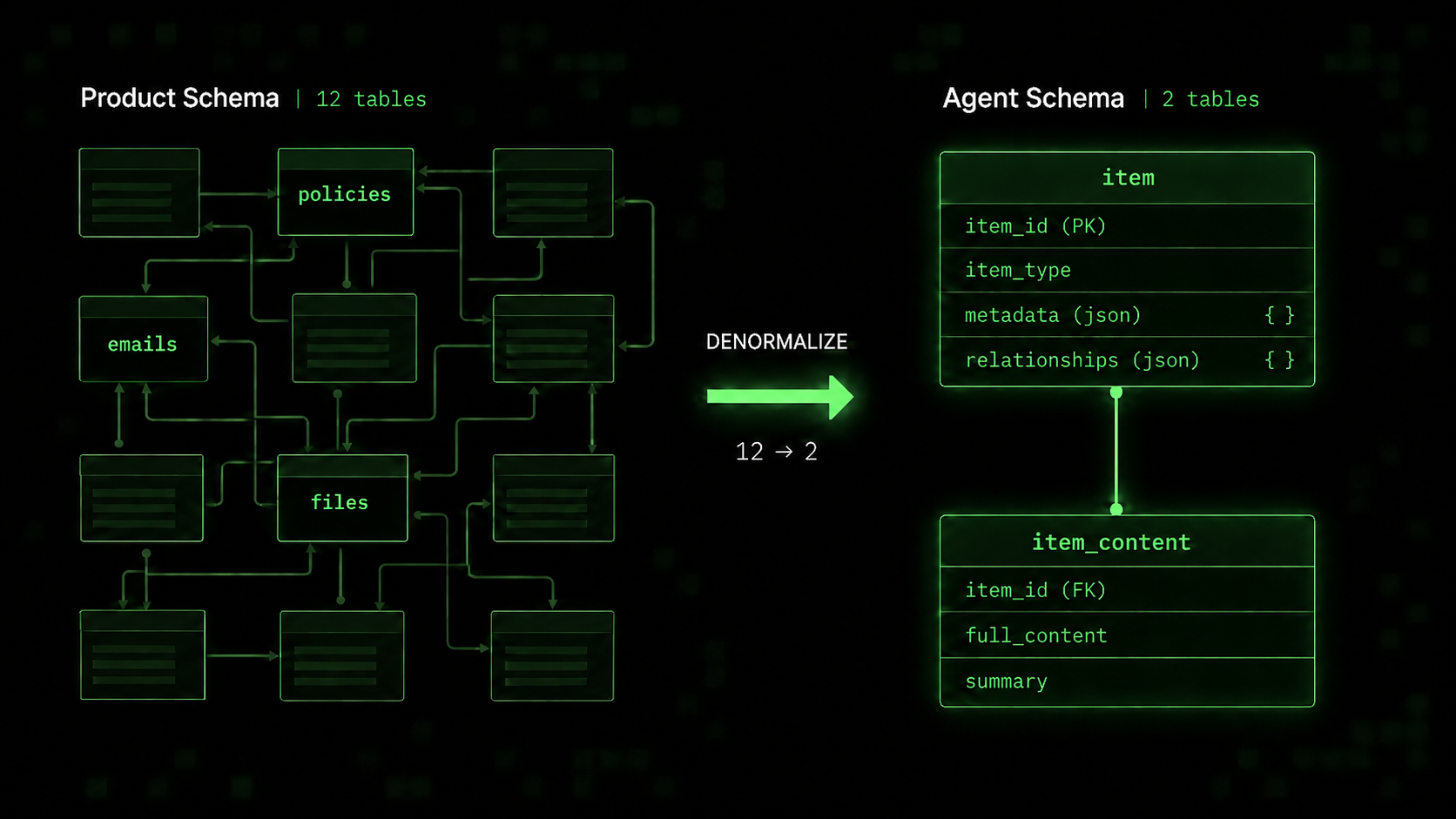
We realized that the logical entities these tables represented were all the same: a piece of content we wanted the agent to be able to read and reason about as well as the relationships between them. Armed with this insight, we decided to denormalize these twelve tables into just two: item and item_content. To make this work we stored the metadata and item relationships in JSON columns. After making this simplification, we noticed a step change in performance.
Simplify search + retrieval
Even with a simplified schema, the agent was still running into problems finding and managing context. In particular, it:
- Struggled to search over the right fields — often only searching over summaries when the full text was available or doing overly specific metadata searches
- Was forced to write complex queries to search across multiple fields; often writing tens of lines of SQL that were occasionally wrong and always hard to reason about
- Would read the file in a context-inefficient way
To solve the first problem, we built a custom table-valued function that allows the agent to do complex text search across ALL fields at once. The function accepts 3 parameters that are all string arrays: any_of, all_of and none_of. Here's an example:
SELECT *
FROM item_search(
  [],                                  -- any_of
  ['location schedule', 'IAG9'],       -- all_of
  ['signed copy']                      -- none_of
)
In return the agent gets back items that contain summaries, relationships with other items and metadata that it can use to decide which items should be explored further (if any). To facilitate that exploration in a token-efficient way, we wrote a custom read-file tool that allows agents to search + paginate within a document. Below is an example result from a tool call searching a policy document for the location schedule.
Found 6 matches for "location schedule" in policy-abc123 (40 pages):

Page 2: 1 match
   ...named insured premises listed in the Location Schedule shall be covered...

Page 3: 3 matches
   ...LOCATION SCHEDULE — endorsement effective 01/31/2025, forms part of Policy IAG9-001...
   ...buildings and contents per Location Schedule attached as Form 02 PP 639...
   ...Location Schedule (Page 35) covers the addresses and limits set out in...

Page 35: 2 matches
   ...LOCATION SCHEDULE  Loc 1: 412 Mill St, Akron OH — Building $2.4M / Contents $850K...
   ...Loc 2: 89 Harbor Dr, Tampa FL — Building $1.1M / Contents $300K (see Location Schedule)...

Navigate: bash read-file.sh policy-abc123 --page <N>
Enforce, don't prevent
Armed with the new search tools, we still saw the agent trying to utilize the context in improper ways like:
- Trying to select the full contents of many files at once which destroyed its context window
- Reading data related to a separate client from the case it was working on which polluted the context window with incorrect data that could confuse the agent
Prompting alone wasn't enough to fix these issues; we needed to make it structurally impossible for the agent to do them. Another downside of prompting is that it constrained the agent's creativity. We found it best to enforce behavior through guards on tools with helpful error messages which guided the agent to the "happy path" solution.
A few examples:
- If the agent tries to directly read the full content of an item from the database it's met with this error:
Cannot reference full_content in SQL — it floods context. Use READ_FILE (bash read-file.sh <item_id>) for paginated content.It can't get around this with a cheekySELECT *either —SELECT * against item_content is blocked (would pull full_content). List explicit columns, e.g. item_id, item_type, summary. - Every query the agent writes is modified before execution with a
{WHERE / AND} client_id = :clientIdfilter. The agent is unaware of this — it just gets the correct results without having to worry about cross-client data issues and we have peace of mind
If you only remember one thing…
Match your context interface to the shape of your data. If your corpus is a web of documents with rich metadata and relationships, you want an interface that preserves that structure — not one that flattens it into a file tree. Filesystem-as-context works when the corpus is a filesystem, but most business data isn't; forcing it through that abstraction costs more than the familiar tooling buys you.